Cleaning Messy Data
This guide helps you:
- Recognize and correct common data quality issues that can affect GIS mapping and analysis.
- Prepare and format tabular datasets according to GIS data structure requirements.
Cleaning Messy Data
Even if your data comes from a published source, it may contain gaps or other flaws that will result in an incomplete or misleading map. Cleaning messy data involves removing errors, duplicates, and inconsistencies to ensure accuracy. It can also involve reformatting your dataset(s) for compatibility with your chosen software. The more data you have, the longer it may take to standardize and clean. While cleaning messy data can be time consuming, overall it saves you time and stress later on.
General Key Data Cleaning Steps
- Create a Backup: Always work on a copy of the original dataset.
- Remove Duplicates & Irrelevant Data: Identify and remove redundant rows to ensure data integrity.
- Standardize Data Formats: Ensure consistent capitalization, date formats, and numeric types (for example, remove leading/trailing spaces).
- Fix Structural Errors: Correct typos, mislabeled classes, and inconsistent naming conventions.
GIS Formatting Considerations
To successfully use a CSV or Google Sheet in GIS software to make a map:
- Each column contains a different type of information:
- For spatial data: latitude/longitude (in separate columns), place names, or addresses.
- Each column has a header in the first row of the table.
- The first character in the column header must be a letter.
- Don’t use special characters (except underscores) or spaces in the header.
- Make sure each header is unique.
- No subheaders.
- Use consistent formatting in a given column.
- Each row represents a different feature.
- No blank rows (or subheaders).
- In a table join, ensure that matching fields have compatible values and formats.
Not this …
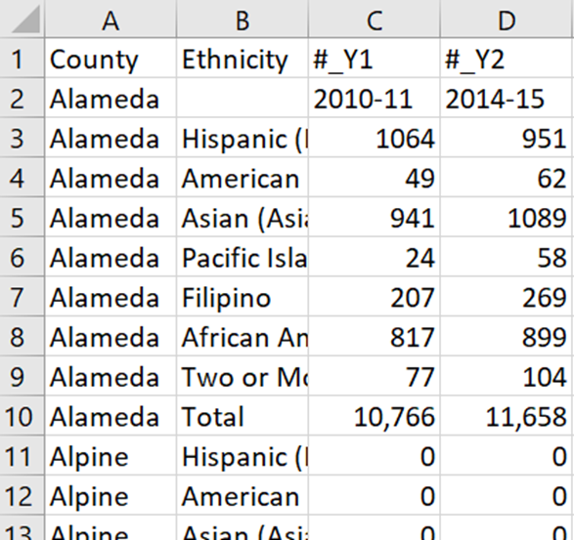
This:

Cleaning Messy Data
- OpenRefine — A powerful free, open-source tool for working with messy data: cleaning it, transforming it from one format into another, and extending it.
General Resources
Need Help?
If you have questions or need assistance, please contact us!